
Customers who have enrolled in Customer Portal can login at any time. The login screen is accessed via the “PAY INVOICE NOW” button in an invoice pdf or invoice email, provided you have configured your system to show it.
You can also link directly to this screen from your website. (See Linking to Customer Portal From Your Website above.)
The Customer Portal login screen is shown below. To login, customers enter their User ID and Password, then click the “log in” button.
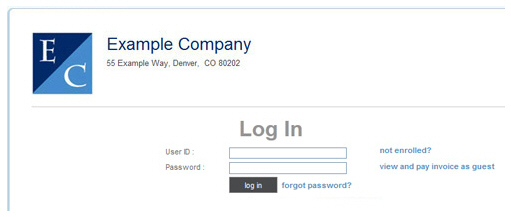
If customers forget their password, they can click the “forgot password?” link to have a new temporary password emailed to the email address associated with their account. Once they login using the temporary password, the system will prompt them to create a new personal password.
Next Section: Managing Account Information >